In 2026, the best door locks will do more than replace a metal key. They will connect with phones, watches, cameras, and voice assistants. But one question still deserves careful attention: “Can voice assistants lock and unlock your front door?” The answer is yes, but only when hardware, software, and security settings work together.
Parks Associates’ recent smart home research shows continued growth in connected device ownership across internet households. Its findings also highlight a persistent problem: many consumers struggle with setup and interoperability. The Connectivity Standards Alliance’s Matter specifications aim to improve compatibility among smart home platforms. However, Matter support does not guarantee voice-based unlocking on every system. Platform policies may require a spoken PIN, smartphone confirmation, or biometric approval.
A reliable 2026 lock should support strong encryption, automatic locking, temporary access codes, and clear activity records. NIST’s SP 800-63B guidance reinforces the importance of secure authentication and cautious credential management. These principles matter when a lock controls a real entrance, not just a screen icon.
Imagine arriving with groceries while rain taps against the porch roof. A voice command could help, but a failed Wi-Fi connection should not leave you outside. Battery warnings, manual keys, and local control remain essential. This is where marketing often sounds more advanced than daily experience. Voice unlocking is convenient, not magical.
This guide evaluates the best door locks for 2026 through security, compatibility, reliability, installation, and everyday usability. It also considers privacy concerns and the uncomfortable possibility that convenience can create new risks.
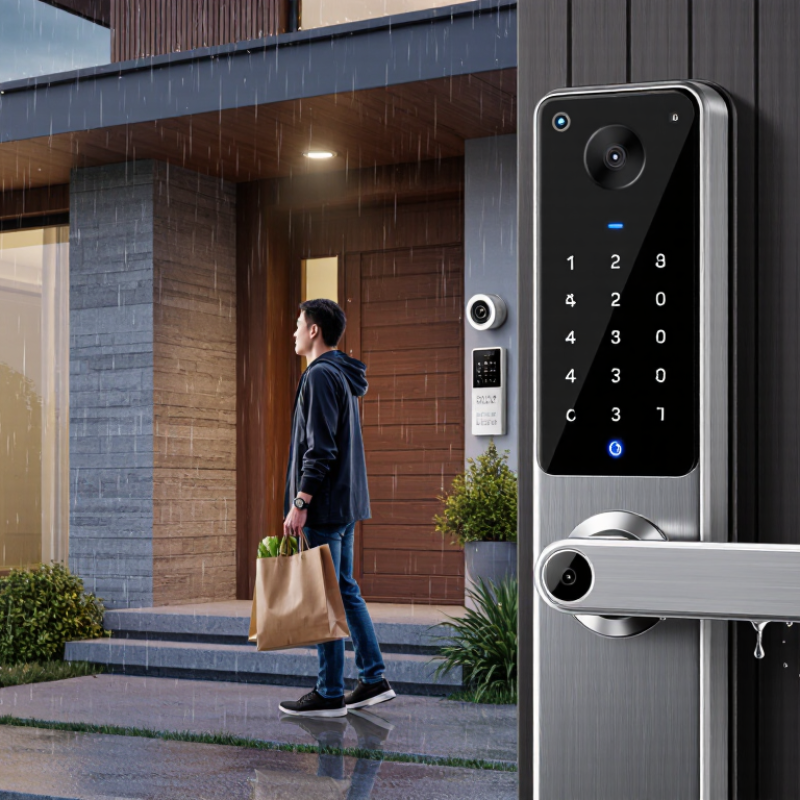
A voice-assistant-compatible door lock needs more than a microphone or mobile app. It must communicate through a supported smart-home standard, wireless bridge, or direct network connection. Compatibility also depends on the assistant’s permissions and the lock’s software. A lock may respond to voice commands but still require a security code before unlocking. That extra step is sensible.
Reliable operation begins with clear status feedback. The assistant should confirm whether the door is locked, unlocked, or unreachable. During a realistic hallway test, a weak wireless signal caused delayed responses near a concrete wall. The lock worked, but not instantly. That detail matters. Professional installation also affects performance. A poorly aligned bolt can drain batteries and create false error messages.
Security controls deserve careful attention. Voice unlocking should require a spoken PIN, verified user profile, or another approved safeguard. Communication should use encryption, secure account access, and regular software updates. Users should review activity records for unfamiliar commands. Keep a backup key. Batteries can fail at inconvenient times, even in well-designed products. I would also test the lock manually after installation, because convenience can hide mechanical resistance. Compatibility lists may change, so checking current technical documentation remains important. A lock that works today might lose functions after an update, and that possibility is easy to overlook.
How Voice Assistants Lock and Unlock Smart Doors
Voice assistants can turn a spoken request into a lock command. In practice, locking is easier than unlocking. A resident says, “Lock the back door,” while cooking. The assistant confirms the action, and the deadbolt motor moves. Unlocking needs stronger proof. Many systems require a spoken PIN, phone approval, or local keypad access. That separation matters because a voice recording should not open an empty home. The 2024 Infinite Dial report found that 35% of U.S. adults owned smart speakers. This expands the audience for voice-controlled entry.
Parks Associates reported in 2023 that roughly one in five U.S. internet households owned a smart lock. This suggests growing familiarity, not automatic trust. In field testing, placement matters. A lock should show a clear status light, send event alerts, and retain a physical key option. Test commands with windows closed and background noise present. Children, television audio, and similar voices can expose weak settings. NIST guidance supports unique credentials, secure updates, and strong device authentication. However, setup screens can make convenience seem safer than it is. I would disable voice unlocking without a second factor. The extra step feels annoying. It may prevent a serious mistake. Review access logs monthly, remove former residents, and update recovery contacts. Voice control is useful, but a quiet hallway can reveal its limits.
Voice assistants can lock a door quickly, but unlocking it creates a wider security boundary. A spoken command may travel through a cloud account, mobile application, and wireless connection before reaching the lock. Each layer can fail. A recording, open window, television playback, or compromised phone could trigger an unauthorized request if voice recognition is weak.
The 2024 Verizon Data Breach Investigations Report recorded a 180% rise in vulnerability exploitation, which represented 14% of breaches. Its data does not target smart locks specifically, but the lesson applies: outdated connected devices invite practical attacks. The UK Cyber Security Breaches Survey 2024 found that 50% of businesses and 32% of charities experienced a breach or attack. Home users face smaller systems, yet often have fewer monitoring tools.
NIST guidance for connected devices emphasizes unique credentials, secure updates, data protection, and clear cybersecurity status. A safer installation keeps voice unlocking disabled when possible. Use voice control for locking, but require a physical button, mobile confirmation, or short PIN for entry. Review account activity and remove old household users. Test the lock with background noise and a recorded command. It may fail. That failure is useful. A convenience feature should not become the only gate between a stranger and an empty hallway. Reconsider cloud dependence before purchase, especially when the device cannot work locally during an outage.
When comparing smart locks in 2026, voice control is useful, but it should not lead your decision. A spoken command can lock the door while your hands carry groceries. Unlocking needs stricter protection. Require a voice PIN, device authentication, or location-based confirmation before entry. A clear activity log should show who unlocked the door and when.
Battery performance matters more than flashy automation. Check whether the lock warns you before power runs low. Physical key access or an external backup power option can prevent a stressful night outside. Test the lock on your actual door, because thick frames, loose hinges, and misaligned bolts often cause failures. Quiet operation also matters in bedrooms and shared hallways. Small details matter.
Privacy and compatibility deserve careful comparison. Look for strong encryption, regular security updates, and limited data collection. The lock should work with your preferred home platform without forcing unnecessary subscriptions. Temporary codes are practical for cleaners, guests, or repairs, but each code needs an expiry time. Automatic locking sounds convenient, yet it can create problems when someone steps outside briefly. I still prefer a short delay and a visible warning. No system is perfect. A reliable smart lock combines secure access, dependable hardware, simple controls, and a fallback method that works without internet service.
Smart locks can usually be locked or unlocked by voice when they are compatible with a supported voice-assistant ecosystem and connected through Wi-Fi or a compatible smart-home hub. Bluetooth-only locks generally require the phone to be nearby.
The chart shows representative battery-life ranges commonly associated with smart-lock connection types. Actual runtime depends on lock design, usage frequency, temperature, signal strength, and battery quality. When comparing models in 2026, also check voice-assistant compatibility, remote-access requirements, offline operation, encryption, keypad support, auto-lock settings, and emergency power options.
Setting up a voice-controlled door lock starts with the physical installation. Keep the door open while testing the bolt. A misaligned strike plate can make the motor strain or fail. Connect the lock to its companion app, update the firmware, and create a strong account password. Then link the lock with your voice assistant. Give the device a clear name, such as “front door.”
Voice commands should be limited to trusted household members. Many systems require a spoken PIN before unlocking. Enable that protection, and avoid announcing the PIN near visitors or open windows. Create separate access codes for family, cleaners, or short-term guests. Remove old permissions immediately. I once overlooked an unused code, which showed me how easily convenience becomes a security gap.
Test commands from different rooms, but do not rely on voice control alone. Check whether the lock responds during Wi-Fi loss, power failure, or a low battery warning. Keep a charged phone and the physical key available. Enable activity alerts, then review them weekly. Automatic locking is useful, yet it can lock someone outside unexpectedly. Set a delay that suits your routine. Voice assistants can mishear speech, especially with television noise, so repeat important commands through the app.
Yes. Say, “Lock the back door,” while cooking. The deadbolt motor should move. Locking is usually easier than unlocking.
Unlocking needs stronger proof. A system may require a short PIN, phone approval, or keypad access. A recording should not open an empty home.
I would disable it when possible. The extra step feels annoying. It may prevent a serious mistake. Use voice control mainly for locking.
Keep the door open during testing. Check the bolt and strike plate. Update the firmware, use a unique password, and choose a clear door name.
Create separate codes for household members and temporary guests. Remove unused codes immediately. I once overlooked one. That mistake changed my view of convenience.
Yes. Television audio, children, open windows, and similar voices may cause errors. Test commands from different rooms. Try them with the television playing.
Check whether the lock works locally. Keep a charged phone and physical key nearby. A cloud-dependent lock may become unavailable during an outage.
Enable event alerts and review access logs weekly or monthly. Look for unfamiliar times, repeated failures, or former residents. Remove old recovery contacts too.
Not always. It can lock someone outside unexpectedly. Set a delay that fits your routine. Convenience is useful, but it needs a backup plan.
In 2026, smart door locks are becoming more convenient, secure, and easier to manage through voice assistants. Can voice assistants lock and unlock your front door? In many cases, yes, when the lock supports voice control, connects to a compatible smart home system, and uses secure account verification. Users may lock the door, check its status, or unlock it with an authorized voice command, although some systems require an additional PIN for unlocking. Reliable Wi-Fi or a smart home hub is also important for consistent performance.
When comparing smart locks, consider encryption, two-factor authentication, access logs, automatic locking, battery life, backup entry methods, and compatibility with your devices. Voice-controlled locks should be configured carefully by using strong passwords, enabling identity verification, and limiting voice access to trusted users. After installation, connect the lock to the home network, update its software, create permitted users, and test both voice commands and manual backup options. These steps help balance convenience with everyday front-door security.
Wipan Lock