Losing a smart lock backup key can feel like a small problem until the battery reaches zero. Then, a locked door becomes a serious inconvenience. What should I do if I lose my smart lock backup key? The safest answer depends on the lock model, access method, and manufacturer’s support process. Do not force the cylinder or copy an unknown key. A damaged lock may create higher replacement costs and weaken home security.
China’s top smart lock suppliers usually provide several recovery options. These may include a registered spare key, temporary mobile access, an emergency power port, or identity verification through an authorized service partner. Reliable suppliers should explain these procedures before purchase. They should also provide clear manuals, model numbers, warranty terms, and responsive after-sales support. Check whether replacement keys can be ordered securely and whether the supplier records key codes responsibly.
Keep the lock model and purchase details nearby. A photo of the label can help. If the key is lost outside your home, consider changing the cylinder or reconfiguring access credentials. That decision should follow professional advice. Some product pages promise easy recovery, but real installation conditions can differ. I have seen customers overlook the emergency power method and depend entirely on one physical key. That is a preventable weakness.
A dependable supplier will not suggest unsafe shortcuts. Instead, it will guide you toward authorized verification, professional servicing, and documented replacement procedures. This article examines practical recovery steps and compares how leading Chinese smart lock suppliers handle lost backup keys.
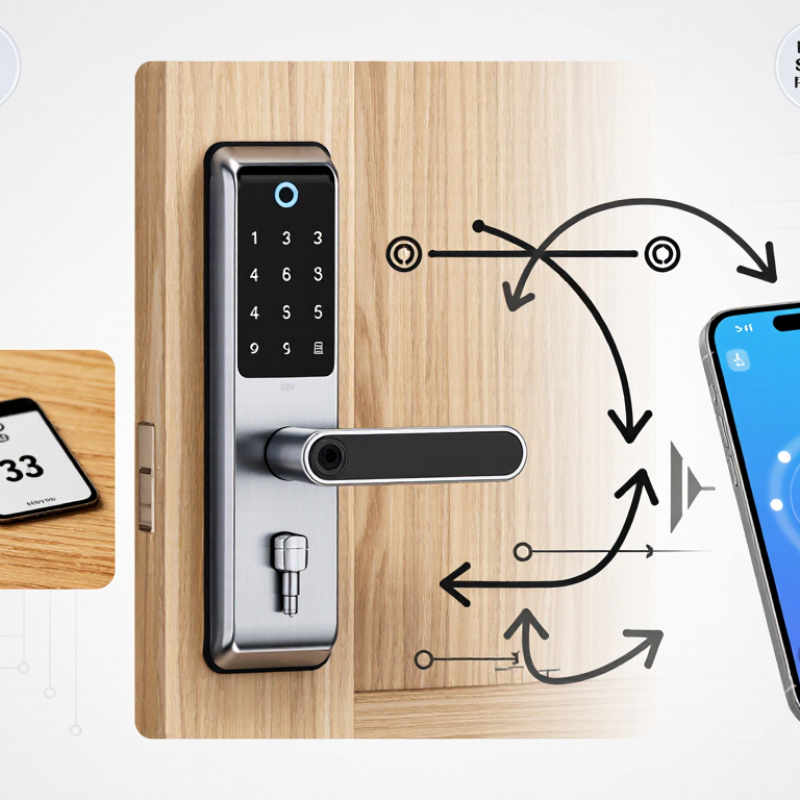
A backup key in a smart lock is more than a spare piece of metal. It is a mechanical override for electronic failure. When batteries die, the key can operate the lock cylinder without Bluetooth, Wi-Fi, or an app. This difference matters during travel, power interruptions, or forgotten access codes. Many smart locks also include an external emergency power port, but that feature does not replace a backup key.
During installation checks, I have seen owners store every key beside the door. I once assumed that was convenient. That assumption was wrong. Anyone finding the key may identify its purpose quickly. Keep one key in a secure, separate location. Keep another with a trusted person if appropriate. Avoid labels showing the property address. Test the key after installation, then test it occasionally. Small problems become serious when the lock is already closed.
If a backup key is lost, do not rely on an unverified duplicate. Contact the supplier or a qualified locksmith and confirm the correct key profile. Reputable suppliers should explain replacement procedures, cylinder options, and key control records clearly. In some cases, changing the cylinder is safer than copying the missing key. Ask whether the replacement key matches the installed mechanism. A poor fit can damage the cylinder. It may also create false confidence. The backup key should turn smoothly, without forcing or scraping.
A mechanical backup key provides an independent access path when the smart lock’s battery is depleted or its electronic features are unavailable. It normally operates the lock cylinder directly and does not require Wi-Fi, mobile apps, or an online account.
What to Do When a Backup Key Is Lost
A lost backup key should be treated as a security concern, not a minor inconvenience. The key may identify your property to anyone who finds it. Act promptly, even if the smart lock still works normally. Record when and where the key disappeared. Check bags, vehicles, drawers, and nearby areas once, then stop delaying action.
Contact the lock supplier or a qualified locksmith for guidance. Ask whether the cylinder can be rekeyed, replaced, or matched with a new emergency key. Do not copy a replacement without confirming the lock’s exact model and key profile. A poorly cut key may jam during a power failure. That risk is easy to overlook.
Review the lock’s access records and remove unfamiliar digital users. Change shared codes, especially if the lost key was stored with identifying information. Keep the new key in a secure location away from the entrance. A sealed container inside the home can work, but it is useless during a lockout. Consider a trusted person instead, with clear instructions.
Test the replacement key with the door open. Check the battery level and emergency power option too. Many owners focus on the missing key and forget the entire backup plan. I would also document the new key’s location privately. That small record can prevent another careless loss.
Losing a backup key can turn a convenient smart lock into a serious access problem. Chinese smart lock suppliers usually begin replacement by checking the lock model, production batch, and key structure. They may request purchase records, installation photos, or the lock’s serial number. This protects the property owner and reduces the risk of sending an incompatible key.
Replacement methods vary between suppliers. Some keep key codes in production records and can cut a matching mechanical key. Others provide a blank key through a distributor, who completes the cutting locally. For electronic access, suppliers may also guide users through temporary passwords, administrator resets, or module replacement. Keep the original instruction sheet. It often contains details support staff need.
The process is not always fast. Factory verification, overseas shipping, and unclear photographs can add several days. A small mistake in the model number may produce the wrong key. I have found that suppliers respond better when customers send clear photos of the keyway, lock face, and identification label. They should explain fees, shipping limits, and verification steps before accepting payment. One practical improvement remains overlooked: record the backup key code privately after installation. Do not store it beside the lock. Availability also depends on product age, because older key systems may no longer have matching blanks.
When a backup key disappears, the problem is not only replacement. It tests how well a supplier supports its product. China top smart lock suppliers should explain their emergency options clearly. Ask whether the lock accepts a replacement cylinder, temporary access code, or external power supply. Request written instructions, not only a sales representative’s promise.
Compatibility must be checked before ordering. Send the supplier your door thickness, lock body dimensions, handle position, and cylinder measurements. Ask for a technical drawing and installation video. A sample lock can reveal problems that photographs hide. Check whether the mobile application supports your operating system and local network conditions. Confirm battery type, warning signals, and access methods during low power. Small details matter.
Support quality becomes visible after a difficult question. Ask how long spare parts remain available and who pays for failed components under warranty. Request response times for installation issues. Reliable suppliers should identify limitations, including doors they cannot fit. In practical sourcing checks, I have seen buyers measure only the door panel. That was not enough. The internal lock case later blocked installation. It is a useful mistake, but an avoidable one. Keep all compatibility answers in writing, including replacement-key procedures and service contacts. A careful supplier may ask for photos before recommending a solution. That extra step often protects both sides.
| Verification Dimension | What to Confirm Before Ordering | Reliable Evidence | Compatibility or Support Risk | Recommended Buyer Action |
|---|---|---|---|---|
| Backup-key replacement | Ask whether replacement mechanical keys can be ordered after the original keys are lost. | Written after-sales policy stating ordering procedure, required documents, lead time, and shipping method. | Some keys may be cut only from an original key, key code, or authorized proof of ownership. | Obtain the replacement-key process in writing before placing a purchase order. |
| Key identification method | Confirm whether the key uses a standard profile, restricted profile, duplicateable blank, or coded system. | Key profile drawing, blank-key reference, cylinder specification, or code-card example. | A visually similar key may have a different profile, blade length, shoulder position, or security coding. | Request a dimensioned key drawing and retain the key code securely. |
| Lock-cylinder format | Verify whether the lock is designed for a Euro-profile cylinder, rim cylinder, mortise cylinder, or another local format. | Installation manual, technical drawing, cylinder photographs, and approved door-preparation dimensions. | A smart lock designed for one cylinder format may not fit another without replacing the cylinder or mortise case. | Send the supplier clear photos and measurements of the existing lock before requesting a quotation. |
| Cylinder dimensions | Confirm both inside and outside cylinder lengths, measured from the fixing-screw center to each end. | Dimensioned technical drawing and a supplier-approved measurement guide. | Incorrect length can cause the cylinder to sit too far inside or outside the door, preventing proper operation. | Measure with the door open and record the two side dimensions separately rather than using a single total length. |
| Door thickness | Check the product’s supported door-thickness range and whether trim, escutcheons, or weather seals affect the measurement. | Product specification sheet, installation template, and sample installation instructions. | A lock may fit the door but fail to align if the included spindle, screws, or mounting plate is too short or too long. | Submit door thickness, edge-to-center distance, backset, and existing-hole measurements together. |
| Emergency entry method | Determine whether the lock supports a mechanical key, external power contact, emergency USB-C input, or another approved access method. | User manual showing emergency-entry steps and a clear description of required accessories. | Not every model supports external power, and an emergency power source may not unlock the door without valid credentials. | Ask for a demonstration video or written procedure and purchase compatible emergency accessories. |
| Proof-of-ownership policy | Confirm what is required to issue replacement keys, reset credentials, or provide technical assistance. | Official support workflow listing acceptable documents and customer-verification steps. | A supplier may refuse key duplication or account recovery without ownership verification for security reasons. | Store the invoice, serial number, key code, installation record, and support contact securely. |
| Spare-parts availability | Check whether cylinders, key blanks, batteries, mounting plates, screws, cables, and exterior covers remain available after purchase. | Spare-parts list with part references, availability period, and ordering channel. | A discontinued component can make a repair or replacement impossible even when the lock body is intact. | Request a recommended spare-parts package for the expected service life. |
| Firmware and app support | Verify operating-system support, account recovery, firmware updates, and offline access options. | Current app requirements, release notes, privacy policy, and support-service terms. | Lost phones, expired accounts, discontinued apps, or unavailable cloud services can affect digital entry. | Maintain at least one independent access method and test account recovery before deployment. |
| Warranty and response time | Confirm warranty duration, exclusions, response hours, replacement procedure, and responsibility for international shipping. | Signed warranty terms, service-level agreement, and named support channel without relying solely on verbal promises. | A low purchase price may be offset by long response times, unavailable parts, or unclear return conditions. | Use a written support test before purchase: send technical questions and record the reply time and completeness. |
| Pre-shipment compatibility test | Confirm whether the supplier can test the exact configuration using the buyer’s door measurements and access requirements. | Pre-shipment inspection report, installation photographs, test video, and configuration checklist. | A standard sample may pass testing while the ordered cylinder length, mortise case, or firmware version is different. | Approve a sample or first article using the final configuration before mass production or bulk shipment. |
When comparing China’s top smart lock suppliers, ask what happens after a backup key disappears. A lost key can create stress, especially during travel or a late-night lockout. Reliable suppliers should explain key control, replacement procedures, and storage options clearly. They should also provide testing records and practical installation guidance. Do not rely on promises alone.
Ways to prevent future backup key loss begin with simple habits. Store the key in a fixed, dry location away from the door. Use a small labeled container, but avoid labels showing your address. Keep a second backup with a trusted household member. Record the key number privately if the supplier provides one. Never leave the key under a mat or inside an outdoor meter box.
Tips: Check the key every three months. Confirm it still turns smoothly. Test it before a long trip. Use a secure home safe when possible. If the key is missing, ask a qualified locksmith or supplier about rekeying. Do not copy keys from uncertain sources. A digital access code may help temporarily, but it should not replace physical backup planning. This system is not foolproof. People forget routines, and batteries can fail. A short written emergency plan can prevent confusion when pressure is high.
Anyone who finds it may connect the key with your property. Treat the loss seriously. Act promptly.
Record when and where you last saw it. Check bags, vehicles, drawers, and nearby areas once. Then stop delaying action.
Yes. Ask whether the lock can be rekeyed or replaced. Request guidance about a compatible emergency key.
Avoid uncertain sources. Confirm the lock model and key profile first. A poorly cut key may jam during a power failure.
Review access records and remove unfamiliar users. Change shared codes if the lost key had identifying information nearby.
Keep it in a fixed, dry place away from the entrance. A sealed container inside the home may work. It fails during a lockout.
Test it with the door open. Confirm that it turns smoothly. Check the battery and emergency power option too.
Check the key every three months. Test it before traveling. Keep another copy with a trusted person. Avoid outdoor hiding places.
Write the key location and recovery steps privately. Include a trusted contact and temporary digital access instructions. The plan is not foolproof. People forget routines. Batteries fail.
Smart lock backup keys provide a reliable mechanical access option when batteries fail, electronic components malfunction, or normal entry methods are unavailable. If you ask, “What should I do if I lose my smart lock backup key,” first secure the lock and check whether another authorized key, access code, mobile credential, or emergency power option is available. Avoid forcing the lock, as this may cause damage and create additional replacement costs.
Reliable Chinese smart lock suppliers should offer a clear key replacement process, including identity or ownership verification, compatible key blanks, and instructions for rekeying or pairing replacement components. Before purchasing, confirm the supplier’s after-sales support, response time, warranty terms, and compatibility with your exact lock model. To prevent future loss, store spare keys in separate secure locations, label them discreetly, keep updated access records, and ask the supplier about safe backup solutions.
Wipan Lock