How to Change the Code on a Keyless Entry Lock in 2026?

Time:2026-11-09 Author:Oliver
0%

How to change the code on a keyless entry lock depends on the lock’s make and model. A touchscreen deadbolt may use a programming code, while a basic keypad model may have different button sequences. Check the manual or the manufacturer’s support page before starting. Keep the door open while you work. That small precaution can prevent an accidental lockout. You may need the current programming code, fresh batteries, and a clear view of the keypad. If the buttons are worn or the display is dim, pause and address that first.

Security technologist Bruce Schneier’s well-known reminder, “Security is a process, not a product,” is useful here. Changing a code is only one part of keeping access secure. Choose a code that is not an obvious date or repeated pattern, and avoid sharing it more widely than necessary. Follow the model-specific steps, then test the new code several times with the door still open. Confirm that any old user codes you meant to remove no longer work. Details matter. Some locks also require you to save each change before exiting programming mode. The process can feel fussier than expected, and manuals are not always clear. If the lock behaves differently from its instructions, stop rather than guessing. This guide explains what to check, how to update codes safely, and how to confirm the lock is working before you close the door.
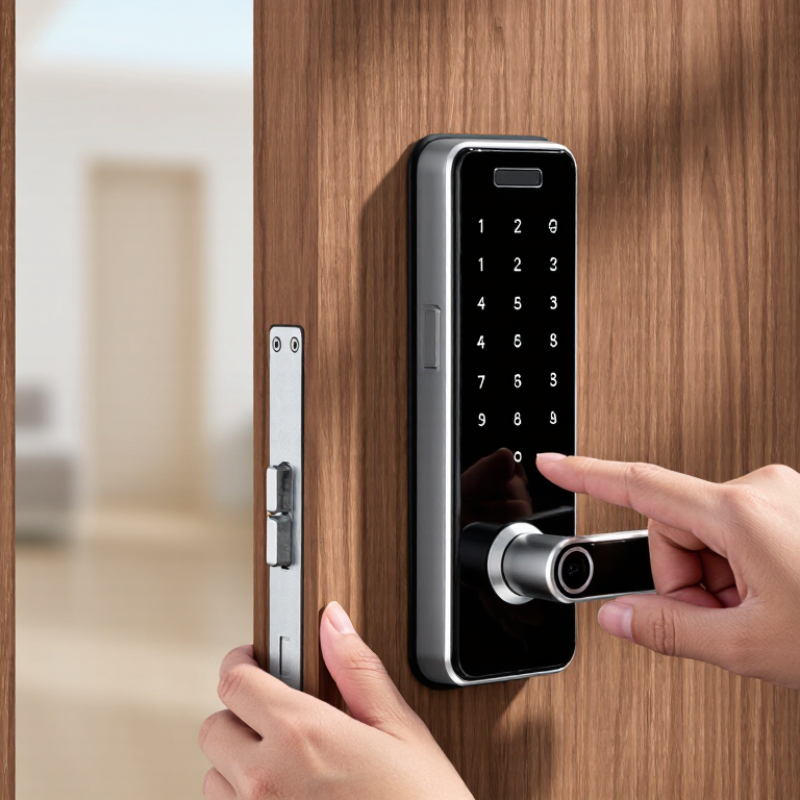
How to Change the Code on a Keyless Entry Lock in 2026?

Identify the Lock Type and Locate Its Programming Instructions

Identify the lock before touching its programming controls. It may be a keypad deadbolt, a retrofit keypad, or an integrated smart lock. Check the inside plate, battery cover, and door edge for a model number. Similar-looking keypads can use different programming sequences. Read the exact model’s official manual or support instructions, and confirm the lock generation.

Read before pressing.

Some models require the door to remain open, an administrator code, or a reset button beneath the battery tray. Keep the door open and the latch clear while testing the new code.

Follow the instructions for adding, deleting, and verifying user codes; a factory reset may not be needed. A keypad-only lock may store codes locally, while a connected model may also rely on app or account settings. Keep the manual somewhere secure, not beside the keypad.

The FBI’s 2023 Crime in the United States report estimated 847,522 burglaries nationwide. That figure does not measure keypad-lock failures, but it is useful context for treating access settings carefully.

One caveat: a forgotten administrator code can complicate setup. Verify the model before resetting anything.

Prepare the Existing Master Code and Choose a New Entry Code

Before changing a keyless lock, locate its current master code in the owner’s manual, setup card, or secure household records. Do not assume the factory code is still active. Check the keypad instructions for the correct programming sequence, and keep the door open while testing changes.

A wrong code can leave you outside. If the master code is missing, use the manufacturer’s documented recovery process rather than guessing.

Choose a new entry code that household members can remember but visitors cannot easily infer. Avoid birthdays, street numbers, repeated digits, and codes written beside the door. If the lock allows separate user codes, give each regular user an individual one; remove codes that are no longer needed.

Verizon’s 2024 Data Breach Investigations Report found stolen credentials were involved in 24% of breaches it analyzed. That figure concerns digital accounts, not keypad locks, but it supports one practical habit: do not reuse important credentials. A unique code is safer.

I still find memorable codes tempting, and that is exactly why I avoid personal dates. After programming, test the new entry code several times with the door open, then verify that the old code no longer works if the lock supports that check.

Enter Programming Mode Using the Lock’s Approved Method

Before changing a keyless entry lock’s code, identify its exact model and consult the supplied manual or the maker’s official instructions. Programming steps vary. A keypad sequence that works on one lock may erase settings on another. Keep the door open while you work, so a mistake does not leave you locked out. Check that the batteries are fresh, too. Low power can interrupt programming midway.

Enter programming mode only through the lock’s approved method. This may involve entering an existing administrator code, pressing a clearly labeled interior button, or following a model-specific sequence. Listen for the stated beep or watch for the indicator light. Do not guess at button combinations or hold controls longer than instructed. If the lock rejects the code, pause and verify the manual’s steps rather than repeating random attempts. That part can feel tedious, but it is safer.

Tips: Keep the door open and the old code available until the new one works. Enter the new code exactly as instructed, then test it several times from outside while someone stays inside. Confirm the bolt moves smoothly and the keypad responds consistently. If you cannot enter programming mode, stop and contact qualified support; forcing the lock or repeatedly resetting it may create a bigger problem.

How to Change the Code on a Keyless Entry Lock in 2026? - Enter Programming Mode Using the Lock’s Approved Method

Step What to Do What to Check Why It Matters
1. Identify the lock Find the model information and consult the lock’s manual or official instructions for its programming procedure. Confirm the instructions match the exact lock model and keypad type. Programming steps and code requirements vary between locks; there is no universal keypad sequence.
2. Prepare the door Keep the door open and make sure the bolt can move freely. Check the batteries and replace weak batteries if needed. Test that the bolt extends and retracts without binding. An open door helps prevent accidental lockout while you change and test the code.
3. Locate the programming credential or control Check the approved instructions for whether the lock requires a programming code, a physical programming button, or another specified method. Do not assume the current user code is the programming code. Some locks use separate credentials or controls for managing user codes.
4. Enter programming mode Follow the model’s approved method exactly, including any required button presses or credential entry. Look for the confirmation described in the instructions, such as a light, beep, or display message. Confirmation helps show that the lock accepted the command and is ready for programming.
5. Add or change the user code Choose the add, replace, or delete-and-add procedure specified for the lock. Enter a code that meets its stated length and format requirements. Use a code that is not easy to guess, such as a repeated sequence or an obvious date. Following the lock’s requirements reduces entry errors and helps protect access.
6. Check the programming result Wait for the lock’s specified success or error signal. If an error appears, repeat the procedure only as directed by the instructions. Confirm that the lock has exited programming mode when required. Signals can indicate whether the code was saved or whether the procedure needs attention.
7. Test before closing the door With the door still open, lock and unlock it using the new code. Repeat the test to verify consistent operation. Check both keypad response and bolt movement. Testing while the door is open helps confirm the change without risking a lockout.
8. Remove outdated access if needed If the lock supports multiple user codes, remove any old or unused code using the approved deletion procedure. Verify which codes remain active according to the lock’s instructions. Removing unneeded codes can reduce the number of people who can access the property.

Important: If the approved instructions are unavailable or the lock does not respond as expected, stop and consult the lock’s official documentation or a qualified lock professional. Avoid repeated guessed sequences, which may trigger a temporary keypad lockout on some models.

Replace or Add a User Code and Save the Change

Changing a keyless entry code is usually simple, but the button sequence varies by lock. Check the instructions for your exact model before you begin. Keep the door open while programming. That small precaution can prevent an avoidable lockout.

Most locks require an existing administrator or programming code to enter setup. Use the keypad as directed, then choose the option to add a user code or replace one. Enter the new code slowly, watching for the lock’s light or tone to confirm each step. Avoid birthdays or easy number patterns. Keep the code private, and do not write it beside the door.

Wait for the confirmation signal before leaving programming mode. Then test the new code several times with the door still open, turning the handle or deadbolt each time. If you are replacing a code, check whether the old one has been removed; some locks store several users’ codes at once. It is easy to assume one confirmation beep means everything saved. It may not. If the keypad rejects the code, pause and consult the model’s instructions rather than repeating random button combinations.

Test the New Code and Secure the Lock Settings

After saving a new entry code, test it while the door remains open. Enter it slowly from the outside keypad, then check that the bolt extends and retracts smoothly. Listen for the motor; a strained buzz may signal a weak battery or misaligned bolt. Try the code twice. Then close the door and test once more, keeping the mechanical key nearby. This small extra step can prevent a frustrating lockout. If entry fails, reopen the door and review the keypad sequence in the lock’s instructions.

Secure the settings after the test. Remove old guest codes, change any factory-set administrator code, and review auto-lock timing and temporary access options. The 2024 Data Breach Investigations Report found that human factors were involved in 68% of breaches it analyzed; that figure covers many kinds of systems, not keyless locks specifically. Still, it is a useful reminder: shared access can create avoidable exposure. Give codes only to people who need them, and delete temporary codes when access ends. Avoid storing the code beside the door. A note in a secure password manager is safer, though not perfect. Check battery warnings and test the code again after replacing batteries or changing lock settings.

FAQS

How do I identify my keyless lock model?

Check the inside plate, battery cover, or door edge for a model number. Similar keypads may use different programming steps.

Should I keep the door open while changing a code?

Yes. Keep the door open and the latch clear while programming and testing. A wrong code can leave you locked out.

What if I cannot find the current master code?

Check the setup card, owner’s manual, or secure household records. Use the documented recovery process instead of guessing.

How should I choose a new entry code?

Avoid birthdays, street numbers, repeated digits, and codes written near the door. A memorable code can still be too predictable.

Can I give each household member a separate code?

If the lock supports multiple user codes, give regular users individual codes. Remove codes for people who no longer need access.

How can I tell whether the new code saved?

Watch for the lock’s light or tone, then test the code several times with the door open. One beep may not confirm everything.

Do I need to reset the lock to change a code?

Not usually. Follow the exact model’s instructions for adding, replacing, or deleting codes before considering a factory reset.

What should I do if the keypad rejects my new code?

Pause and check the model-specific instructions. Random button combinations can make setup more confusing. I would not keep guessing.

Conclusion

How to change the code on a keyless entry lock starts with identifying the lock type and checking its own programming instructions, since the steps can vary. Before making changes, have the current master code ready and choose a new entry code that is easy for authorized users to remember but not easy for others to guess. Avoid using personal details or obvious number sequences.

Use the lock’s approved method to enter programming mode, then replace an existing user code or add a new one and save the change as instructed. Test the new code several times while the door is open to confirm it works before closing and securing the door. If the lock provides settings for managing user codes, review them and remove any codes that are no longer needed. Keep the master code in a secure place, and consult the lock’s instructions if programming mode does not work as expected.

Oliver

Oliver

Oliver is a seasoned marketing professional with a wealth of expertise in driving brand awareness and engagement. With a deep understanding of our company's product offerings, he consistently delivers high-quality content that enriches our professional blog. His insights not only shed light on......